Applicable to:
eufyCam 2 Pro, eufyCam 2C Pro, eufyCam 2, eufyCam 2C, eufyCam
Charging Your eufyCam/2/2 Pro
There are two ways to charge your eufyCam/2/2 Pro camera:
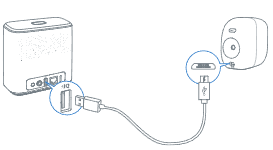
- Connect the eufyCam/2/2 Pro camera to the back of your eufy HomeBase 2 using the provided micro-USB charging cable.

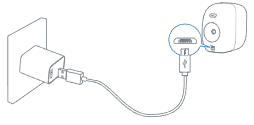
- Connect the eufyCam/2/2 Pro camera to a 5V/2A power adapter using the provided micro-USB charging cable, then plug the power adapter into a wall outlet.

Charging Your eufyCam E
There are two ways to charge your eufyCam E camera:
- Connect the eufyCam E camera to the back of your eufy HomeBase E using the provided micro-USB charging cable.
- Connect the eufyCam E camera to a 5V/2A power adapter using the provided micro-USB charging cable, then plug the power adapter into a wall outlet.
Charging Your eufyCam 2C/2C Pro
There are two ways to charge your eufyCam 2C/2C Pro camera:
- Connect the eufyCam 2C/2C Pro camera to the back of your eufy HomeBase 2 using the provided micro-USB charging cable.

- Connect the eufyCam 2C/2C Pro camera to a 5V/2A power adapter using the provided micro-USB charging cable, then plug the power adapter into a wall outlet.

Charging Your eufyCam 3/3C
How to charge the S330/S300 eufyCam (eufyCam 3/3C) ?
If you have further questions regarding how to charge your eufyCam, please contact us for assistance.
Was this article helpful?
That’s Great!
Thank you for your feedback
Sorry! We couldn't be helpful
Thank you for your feedback
Feedback sent
We appreciate your effort and will try to fix the article