Compatible with:
S330 eufyCam(eufyCam 3), S300 eufyCam(eufyCam 3C), eufyCam E330 (Professional)
If your HomeBase 3 is showing “Offline” in the eufy Security app, please try the following troubleshooting steps to verify if the issue can be resolved.
Make sure the HomeBase is plugged in properly
When the HomeBase is plugged into a working wall outlet, its LED indicator light will light up.
If the HomeBase does not display an indicator light, please try using a different 12V/2A power adapter and a different wall outlet.
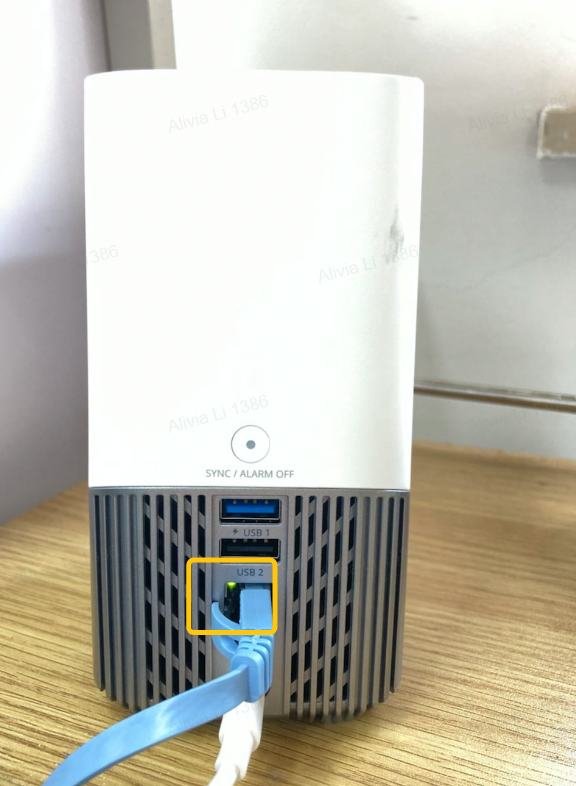
Check the Ethernet cable
If your HomeBase is connected to your router via an Ethernet cable, please verify the cable does not have a loose connection.
The Ethernet port indicator light on the HomeBase will also light up when a cable is securely connected. If the indicator light does not light up, please try using a different Ethernet cable.
Restart your router
The router may encounter connection errors from time to time, which leads to devices disconnecting from the router.
You can try restarting the router and reconnecting the HomeBase again by unplugging your router from the power outlet, waiting for approximately 30 seconds, and then plugging the power adapter back in.
Reboot the HomeBase
If the HomeBase remains offline in the app, please try rebooting the HomeBase.
To reboot the HomeBase, simply follow the steps below:
- Unplug the power adapter and Ethernet cable from the HomeBase.
- Wait for approximately 30 seconds.
- Plug the HomeBase back into the power outlet and plug in the Ethernet cable.
Remove the HomeBase
If the troubleshooting steps listed above cannot resolve the issue, please try removing the HomeBase from the app. (HomeBase > Settings > Remove Device)
After the HomeBase is removed from the app, please set up the HomeBase again as a new device. Please refer to the following article for detailed information: Setting Up eufy S380 HomeBase (HomeBase 3) in the eufy Security App
If the issue still persists, please contact us for further assistance.
Was this article helpful?
That’s Great!
Thank you for your feedback
Sorry! We couldn't be helpful
Thank you for your feedback
Feedback sent
We appreciate your effort and will try to fix the article