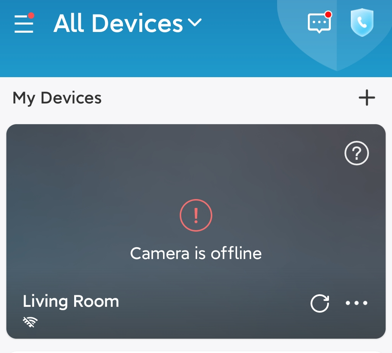
If your eufyCam 3/3C is showing “Offline” in the eufy Security app as shown in the photo below, please try the following troubleshooting steps to verify if the issue can be resolved.
Refresh the camera status
When the camera is showing offline in the app, please try tapping the highlighted Refresh Icon shown in the following photo and wait for a few minutes to verify if the camera is able to refresh its status.

Fully charge the camera
Please refer to the following article that explains the process of charging the camera: How to Charge eufyCam
Check the camera status
Press and release the SYNC button on the camera to check if the camera has been switched off. If the camera’s LED indicator light does not light up, please configure the camera settings in the app or press and hold the SYNC button on the camera for two seconds to boot up the camera.
Shorten the distance between HomeBase and the camera
Please note that eufyCam 3/3C connects to the HomeBase 3 directly. If the camera is showing offline in the app, it is highly recommended to try placing the camera within two feet of the HomeBase to verify if it’s a range issue.
Remove and add the camera again
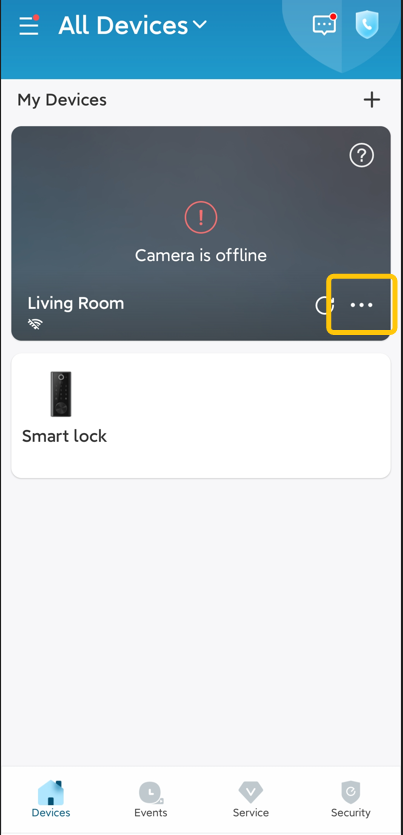
Remove the camera that is showing offline in the eufy Security app first, and then set up the camera again as a new device: Setting Up S330/S300 eufyCam (eufyCam 3/3C) in the eufy Security App

If the issue still persists, please contact us for further assistance.
Was this article helpful?
That’s Great!
Thank you for your feedback
Sorry! We couldn't be helpful
Thank you for your feedback
Feedback sent
We appreciate your effort and will try to fix the article