If your eufyCam 3/3C failed to add in the eufy Security app, please follow the troubleshooting steps listed below to resolve the issue.
Preparation Before Setting Up eufyCam 3/3C
1. Make sure the eufyCam 3/3C has power and its LED indicator light shows a blue light. If not, please use the provided Micro USB charging cable in the package to charge the camera via the HomeBase 3 or connect the camera to a 9V/2A, 5V/2A, or 5V/1A power adapter. It usually takes approximately four to six hours to fully charge the camera from 0 to 100%.
2. Make sure you have already set up your HomeBase 3 in the eufy Security app before you set up the camera. Simply follow the instructions listed in this article: Setting Up eufy S380 HomeBase (HomeBase 3) in the eufy Security App
If the HomeBase 3 failed to add in the eufy Security app, please try the troubleshooting steps listed in this article: Failed to Add eufy S380 HomeBase (HomeBase 3) in the eufy Security App

3. Make sure your smartphone is connected to the same WiFi router that the HomeBase 3 is connected to.
Note: The WiFi network name displayed on your smartphone's WiFi settings should be the same as your WiFi router’s network name.

4. Please remove the plastic film from the camera lens.
5. If you have already added your eufyCam 3/3C under your HomeBase 3, but the camera appears to be offline and you cannot reconnect the camera again or add a new camera, please restart the HomeBase 3 and reconnect it again.
Add eufyCam 3/3C in the eufy Security App
1. Please make sure you have downloaded the latest version of the eufy Security app. You can download it from the App Store (iOS) or Google Play (Android). Please note that the eufy Security app is compatible with Android OS (8.0+) and iOS (11+) phones and tablets. Visit eufy Security app to learn more about the app.
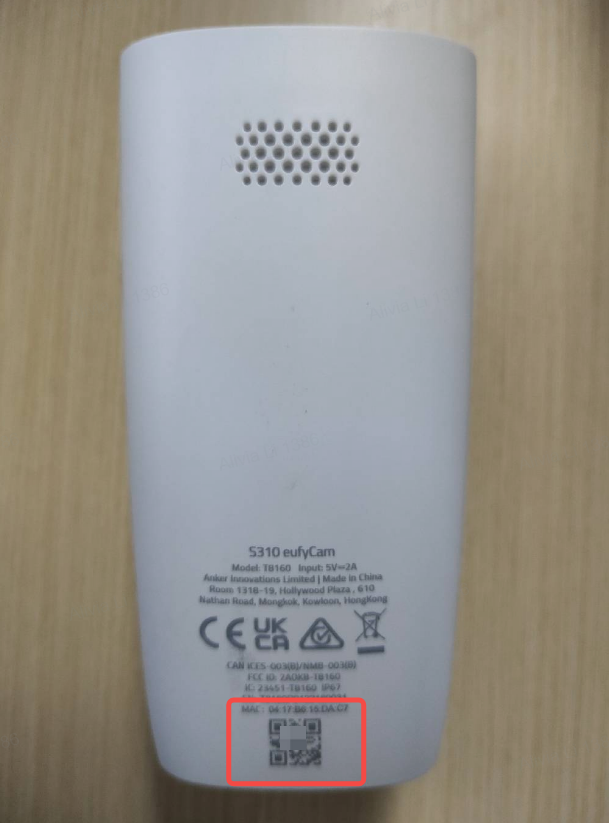
2. Please make sure to choose the correct device by selecting “eufyCam 3” or “eufyCam 3C” when you add the camera in the app. You can find the device model information at the bottom of the camera.


3. When you press and hold the SYNC button on the camera for two seconds but fail to hear a beeping sound, please try the following troubleshooting steps to resolve the issue:
- Press and hold the SYNC button on the camera for at least two seconds until the LED indicator light flashes blue.
- If it still does not emit a beeping sound after the SYNC button on the camera has been pressed for more than two seconds, try to first charge the camera for 30 minutes and then press the SYNC button on the camera five times within three seconds until you hear two beeps to restart the camera. Afterward, please try the pairing process again.

4. When your HomeBase 3 broadcasts an audible sound and enters the pairing mode:
- Please make sure you have pressed and held the SYNC button on the camera for two seconds until you hear a beeping sound.
- Make sure the camera is within 1m/3.3ft from the HomeBase 3.
- Check if the LED indicator light on the front of the HomeBase 3 turns from red to blue
Was this article helpful?
That’s Great!
Thank you for your feedback
Sorry! We couldn't be helpful
Thank you for your feedback
Feedback sent
We appreciate your effort and will try to fix the article