Compatible with:
Video Doorbell 2K (Battery-Powered), eufy Security Video Doorbell 1080p (Battery-Powered)
Every battery doorbell ships out from the factory with the battery charged to approximately 60% - 80% for safe transportation. Fully charge it before using it.
Detach Battery Doorbell First
Before you recharge the doorbell, please detach the doorbell first according to the following instructions:
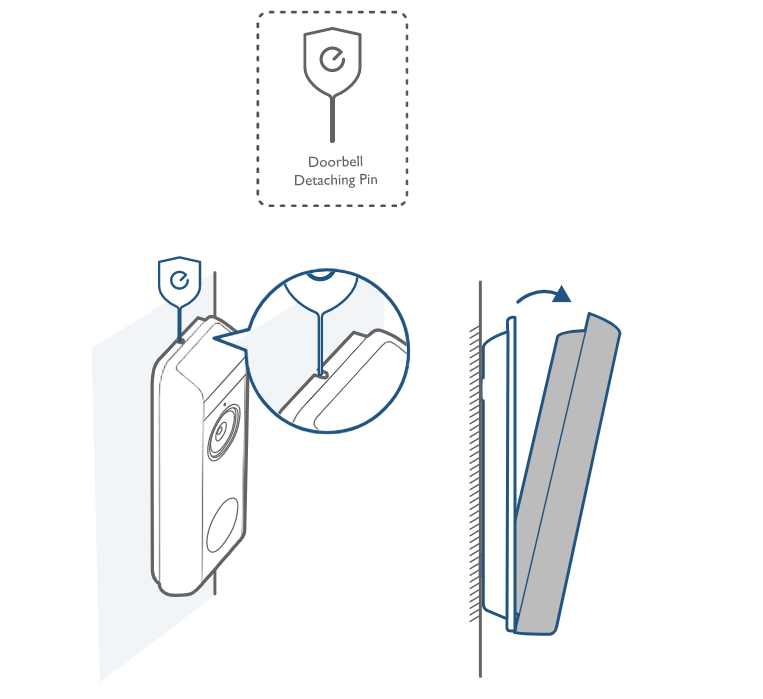
1. Use the doorbell detaching pin provided if you wish to detach the doorbell from the mounting bracket.
2. Press into the pinhole on top of the doorbell, and then lift the top for removal. What you need: Doorbell Detaching Pin.
2K Battery Doorbell
The 2K battery doorbell (T8210) has a built-in 6500mAh battery. You can charge the battery doorbell with a 5V/2A, 5V/1A USB charger.
- If using 5V 1A, it takes about 6 hours to charge from 0% to 100%.
- If using 5V 2A, it takes about 3 hours.
Note: The HomeBase 2 USB port is a 5V/2A USB charging port.
1080P Battery Doorbell
The 1080P battery doorbell (T8220/T8222) has a built-in 5000mAh battery. You can charge the battery doorbell with a 5V/1A USB charger. If using 5V 1A, it takes about 6 hours to charge from 0% to 100%.
Learn More
If you have any questions, please contact us for further assistance.
Was this article helpful?
That’s Great!
Thank you for your feedback
Sorry! We couldn't be helpful
Thank you for your feedback
Feedback sent
We appreciate your effort and will try to fix the article