Installing the battery pack:
To install the battery pack, insert the bottom of the battery into the two locating slots then press to clip the top of the battery pack in place.
Checking battery level:
Can be viewed by selecting BATT in the main menu which will display a battery voltage.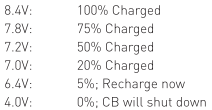
Side buttons:
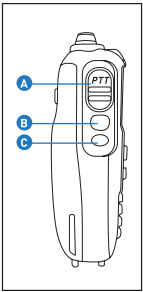
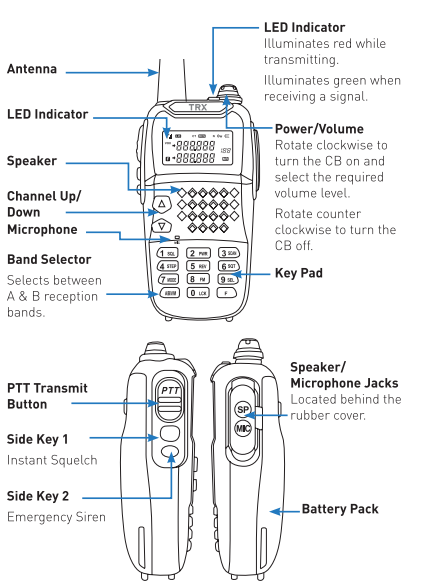
Transmitting: To transmit messages, press the PTT transmit button (A).
Squelch: Use this function (B) if you require to hear all channel noise, necessary if your signal is weak.
Emergency siren: Press this button (C) to activate a siren and use volume tool to adjust volume.
Functions:
F+6SQT: Access CTCSS and DCS menu, using channel up/down keys to select desired setting.
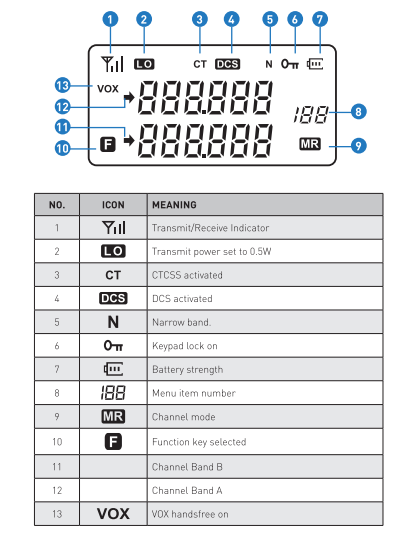
F+2PWR: Transmit power adjustment, which you can use to lengthen battery life. Default is 5W, which can be adjusted to 3W or .5W by using the channel up/down buttons.
F+3SCN: Channel scan to check all 80 channels, and pause on any channel where a transmission is detected. It will stop for 3 seconds after a transmission is detected, and if a new one isn't detected, will move on.
F+7MODE: Adjusts the CTCSS or DCS value, using the channel up/down buttons.
F+8FM: activated the FM radio to find stations using the channel up/down buttons.
F press and hold: Keypad lock. Use after configuring the setting how you want, to avoid accidently pressing buttons further on. Hold again to unlock.
Was this article helpful?
That’s Great!
Thank you for your feedback
Sorry! We couldn't be helpful
Thank you for your feedback
Feedback sent
We appreciate your effort and will try to fix the article